 RecycleOne
Home
RecycleOne
Home
RecycleOne gives your team live reporting, accurate material tracking, and streamlined daily operations — all from one platform.
Unfortunately the Doris Auto submit will be down for 2 weeks until I return my apologies
Discover untapped CRV convenience zones across California. ZoneLock shows you exactly where unserved zones are, which anchor stores create placement opportunities, and where your competitors operate. Visit ZoneLock.com to explore territories and secure your zone.
Alex will be out of the office from May 5, 2026 through May 19, 2026.
During this time, please communicate via text message, as service may be sporadic. Due to time zone differences, responses may also be delayed; however, I will make every effort to respond as promptly as possible.
In the event of a service interruption, please remember that the system can continue to operate in Airplane Mode until connectivity is restored.
Thank you for your understanding.
-----------------------------------------
Alex estará fuera de la oficina desde el 5 de mayo de 2026 hasta el 19 de mayo de 2026.
Durante este tiempo, por favor comuníquese por mensaje de texto, ya que el servicio puede ser intermitente. Debido a la diferencia de zona horaria, las respuestas también pueden retrasarse; sin embargo, haré todo lo posible por responder lo más pronto posible.
En caso de una interrupción del servicio, recuerde que el sistema puede seguir funcionando en Modo Avión hasta que se restablezca la conexión.
Gracias por su comprensión.
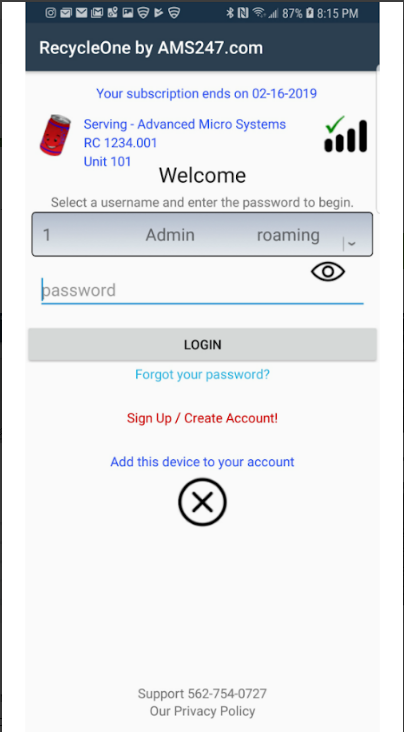
Enter your RC number to get started
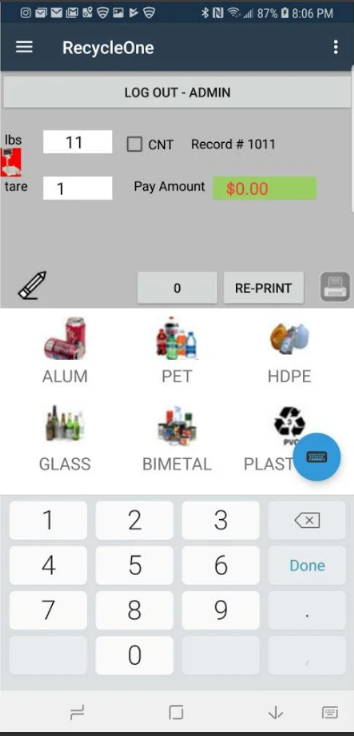
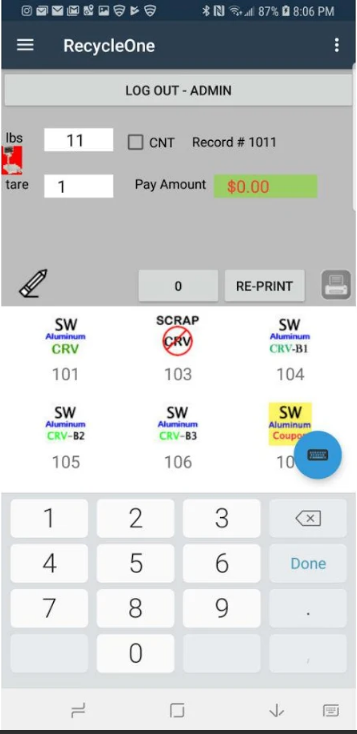
Designed for California recycling center operators. Material type and grade are selected using large images — anyone can use this system.
Able to function at remote locations without internet for up to two weeks. Syncs records when a connection is available.
On-hand material inventory, revenue generated, and monies paid out — available in real time at any location.
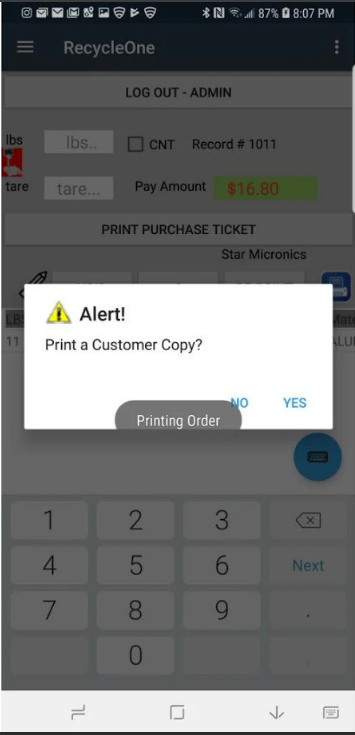
Generates DR6, Daily Purchase, and other reports that create an auditable paper trail. No more receipts and logs at the end of the day.
Capture scale weight through Bluetooth with multiple scale selection. No more manual entry errors.
Individual secure login per user, with accounts that update across all your locations. Protected by industry standards.
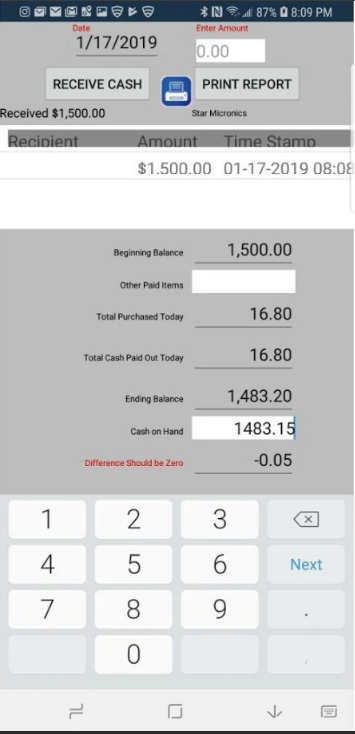
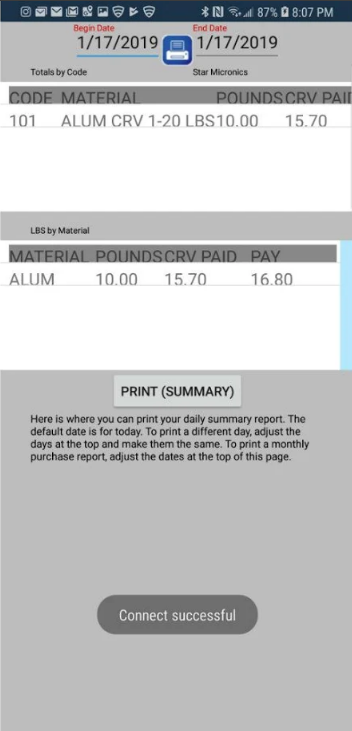
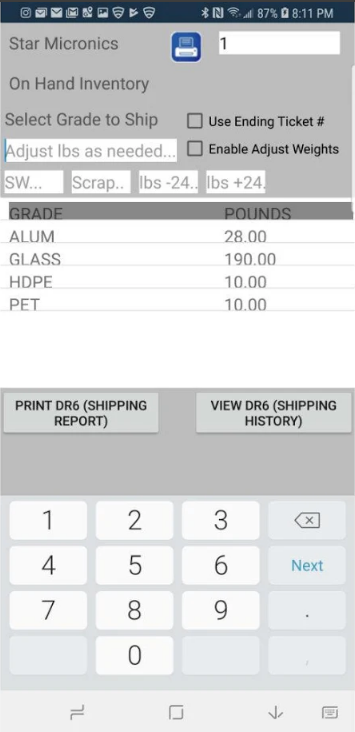
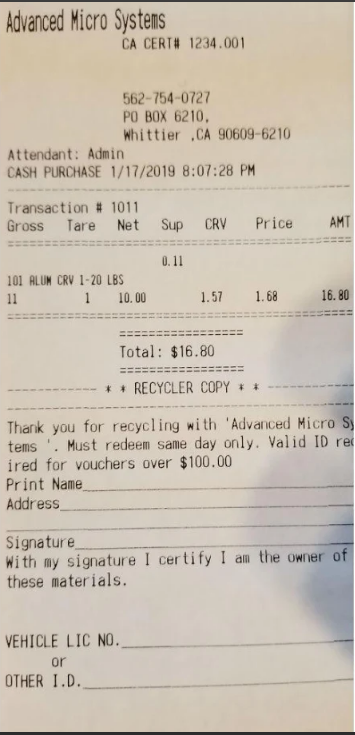
See exactly how RecycleOne Accounting works — from the buyback window to your year-end close. Every module, every workflow, every GL account explained.
You're protected by industry-leading security standards.
© 2026 RecycleOne — All Rights Reserved
Full feature reference for California CRV recycling operators
Complete Financial Management for California CRV Recycling Operations — Full Feature Guide
Most recycling operators run their business on one system and their books on another. Every month, someone has to bridge the gap — exporting data, re-keying numbers into QuickBooks or a spreadsheet, and hoping nothing gets lost in translation. The RecycleOne Accounting Module eliminates that gap entirely.
It lives inside your existing RecycleOne system, reads directly from your transaction data, and gives you a complete double-entry general ledger purpose-built for California CRV recycling. No duplicate data entry. No month-end scrambles. No wondering whether your books match your buyback window.
When a customer places materials on the scale at your buyback window, RecycleOne processes the transaction on the tablet and automatically generates a balanced journal entry in real time. The system debits CRV Material Purchases (5000-series) by grade and credits Cash Drawer (1010) or Customer Deposits based on your pay window configuration. By the time the customer walks away, your books already reflect the transaction — always current, never days behind.
Every dollar that moves through your operation follows a clear path from the buyback window to your financial statements:
View cash drawer balance uploaded from tablet, track expected vs. actual cash based on tablet transaction totals, and post variances to the GL automatically. Structured end-of-day workflow guides staff through counting, reconciling, and recording the deposit.
Browse every CRV transaction processed through RecycleOne. Filter by date, material, operator, or payment method. Click any transaction to see the exact GL journal entry it generated, including which accounts were debited and credited.
Track every DR-6 load with shipped weight, CRV owed, and payment status. Record state and processor payments individually or in batch. Automatic shrinkage calculation between shipped and received weight. Posts to GL accounts 4000, 4020, and 4030 with a single entry.
Record processor payments by material grade with auto-mapped GL accounts. Track revenue per material type with price-per-pound analysis. Supports multiple bank accounts — deposit to whichever account the check was received in.
Auto-calculates expected CZ fee from your DR14 container counts using the 10% glass/plastic threshold rule. Record the actual CalRecycle payment and post to GL 4040. Tracks variance between expected and received CZ payments.
Catch-all for non-standard revenue: e-waste fees, commercial processing, cardboard and paper sales, equipment sold, miscellaneous income. Each category maps to its own GL account for clean P&L reporting.
Full accounts receivable with customer management, invoice creation and delivery (email/print), payment recording, and credit memos. Supports partial payments, overpayment credits, and bad debt write-offs. Invoice status flows from draft through sent, partial, paid, and overdue automatically.
Snapshot of all outstanding receivables bucketed by age: Current, 1–30, 31–60, 61–90, and 91+ days past due. Click any bucket to filter to those customers. Drill into individual invoices per customer. Export to CSV or print. Fully as-of-date — run it for any historical date.
Full accounts payable workflow: enter vendor bills, track due dates and payment terms, approve and pay. Supports direct payments and bill-against-payment matching. Recurring bills (weekly through annual) auto-generate on schedule so you never miss a utility or lease payment.
Write and print checks on standard check stock. Sequential check numbering per bank account, complete check register, and void/reissue workflow. Pay against open AP bills or write standalone checks for one-off expenses.
Vendor management with encrypted TIN storage, W-9 collection status, and automatic 1099-NEC eligibility detection based on annual payment totals. Backup withholding at 24% for non-compliant vendors, automatically calculated and posted to GL 2250. Year-end 1099 summary export ready for filing.
Spending trends over time, top vendor rankings, category breakdowns, and cost-growth alerts. See when a specific expense category is growing faster than revenue — before it becomes a problem.
Hours flow directly from your RecycleOne tablet timeclocks — no re-entry. Supports multiple locations with one payroll run covering all sites. Employees clock in and out on the same tablets they use for buyback transactions.
Federal and California withholding calculated automatically using current tax tables: federal income tax (2024 tables), Social Security (6.2%), Medicare (1.45%), California SDI, and SIT. Employer-side taxes (FUTA, SUTA, ER Social Security, ER Medicare) calculated and posted separately.
Payroll journal entries post to detailed sub-accounts: Wages & Salaries (6170), Vacation Pay (6171), Employer Taxes (6180), Benefits (6190), and tax withholding liabilities split across GL 2151–2158 (federal income, SS employee, SS employer, Medicare employee, Medicare employer, CA SIT, SDI, FUTA/SUTA). Every liability account is tracked separately for tax deposit management.
At-a-glance view of all outstanding payroll tax liabilities with deposit tracking. See exactly what you owe to the IRS and EDD by account, and record deposits as you make them. Prevents missed deposit deadlines.
Configurable vacation policy: accrual rate per hour worked, annual cap, waiting period for new employees. Vacation balance tracked per employee. Vacation pay posts to GL 6171 separately from regular wages, and accrued vacation liability posts to GL 2159.
Payroll data is structured and stored to support IRS Form 941, California DE 9 / DE 9C, and W-2 generation. The data model is form-ready — quarterly and annual tax reporting pulls directly from posted payroll records.
Track all capital assets: equipment, vehicles, leasehold improvements. Each asset record holds purchase date, cost, useful life, salvage value, asset category (GL 1500/1600/1700-series), and current book value. Supports straight-line and declining balance depreciation methods.
Auto-generates the full depreciation schedule for each asset through its useful life. Post monthly depreciation with one click — debits Depreciation Expense (6140) and credits the appropriate Accumulated Depreciation account (1510, 1610, or 1710). Partial-year calculations handled automatically.
Record asset sales or retirements. Calculates gain or loss based on book value at disposal date. Automatically posts to Gain on Sale (7200) or Loss on Sale (7300) and removes the asset and its accumulated depreciation from the balance sheet in one entry.
Print the full depreciation schedule for any asset or the entire asset register. Export to CSV for your tax preparer or insurance carrier. Book value summary feeds directly into the Balance Sheet.
Revenue minus COGS minus expenses, grouped by account type. Includes % of Revenue column for every line. Period comparison mode shows prior period or prior year side-by-side with dollar change and direction arrows. Export to CSV, print with company header.
Assets, liabilities, and equity with sub-categorization: current assets, fixed assets, current liabilities, long-term liabilities, and equity. Retained Earnings reflects all closed fiscal years automatically. A = L + E verified on every run.
Indirect method: starts with Net Income and adjusts for non-cash items (depreciation) and working capital changes (AR, AP, sales tax payable). Investing activities show fixed asset purchases and disposals. Ending cash balance ties directly to GL cash accounts — always reconciled. Per-account cash flow classification is set in the Chart of Accounts.
Outstanding receivables bucketed by age as of any date. Summary cards show totals by bucket with click-to-filter. Customer drill-down shows individual invoice detail. Color-coded by severity. Export CSV or print.
Profitability broken down by material grade: aluminum, PET, glass, bi-metal, and more. Shows what you paid per pound vs. what the state reimburses vs. what processors pay. Identifies which materials make money and which are break-even or loss leaders. The supplement (above-CRV) column shows the competitive premium you're paying by grade.
Create annual budgets with monthly targets for every P&L account in a spreadsheet-style grid. Seed from prior year actuals with one click. The Budget vs Actual report compares budgeted amounts to real GL activity for any month range, with variance $ and % columns. Color-coded: green = favorable, red = unfavorable, based on account type (over-revenue is good; over-expense is bad).
Pre-loaded with 60+ accounts designed for CRV recycling operations: cash accounts (1000-series), AR, fixed assets with accumulated depreciation, AP, payroll liabilities (2151–2158), revenue by source (4000-series), COGS by material grade (5000-series), and expenses. Plain-language tooltips explain every account in recycling terms. Add custom accounts or deactivate unused ones.
Manual journal entry with account search, debit/credit columns, and balance enforcement — the entry cannot be posted unless debits equal credits. Every automated posting from every module flows through the same validated journal entry system. Void any entry with one click; the system creates an automatic reversing entry and marks both void.
Schedule any journal entry to recur automatically: daily, weekly, monthly, quarterly, or annually. Set an end date or let it run indefinitely. Recurring entries post automatically on schedule and appear in the GL like any other journal entry. Use for rent, loan payments, insurance, or any predictable recurring transaction.
Match your bank statement to the GL account by account. Mark transactions as cleared, track outstanding checks and deposits in transit. Running reconciled balance and unreconciled difference update in real time as you work. Post adjusting entries for bank fees or interest from within the reconciliation. Undo the last reconciliation if corrections are needed.
Complete, tamper-evident log of every financial action: journal entries posted and voided, payments recorded, bills created, payroll runs, year-end closes, and user logins. Filter by user, date, action type, or module. Cannot be edited or deleted. Satisfies both internal control requirements and external audit requests.
Close any fiscal year with one click. Preview the closing journal entry before posting — see exactly which accounts will be zeroed and what transfers to Retained Earnings (3200). After posting, the period is hard-locked: no transaction in any module can be posted to a closed period. Undo the most recent close if corrections are needed before the books are finalized.
Step-by-step onboarding walks you through every required configuration before entering a transaction: fiscal year start month, chart of accounts review, bank account setup, opening balance entry, and user preferences. Progress is saved — come back and pick up where you left off. Each step is marked complete as you finish it.
Add unlimited bank accounts (checking, savings, money market). Each account has its own GL account number in the 1000-series. Revenue entries, AP payments, and payroll can each be directed to any bank account. Bank reconciliation runs independently per account.
Closed fiscal years are hard-locked system-wide. No bill, payment, check, revenue entry, payroll run, or journal entry can be posted to a closed period from any module. Prevents accidental modification of finalized books without requiring separate permissions management.
Configure fiscal year start month (any month), default tax rates, payroll settings (vacation policy, accrual rate, waiting period, cap), and module-level defaults. Settings apply across all users at the location.
Every CRV transaction at the buyback window posts a GL entry automatically. Your books are current in real time — not hours or days behind.
DR-6 shipments, state warrants, convenience zones, material-level P&L, grade-specific COGS. Not generic accounting with recycling bolted on.
No exporting to QuickBooks. No re-keying numbers. The accounting module reads the same database your operations team uses every day.
Each location has independent books. Consolidated reports combine data across all locations. Process payroll from one location covering all sites.
Every account and every module has tooltips and guidance written for recycling operators — not CPAs. Your staff can use it without accounting training.
Tamper-evident audit trail, period locking, double-entry enforcement, and encrypted TIN storage. Built to satisfy both internal controls and external review.
The accounting module is available as a free 3-month trial to all RecycleOne customers. During the trial, every feature is fully functional with no restrictions. No credit card required to start.
To activate: click Start Free Trial on the Accounting Dashboard, then run the Guided Setup Wizard to configure your chart of accounts, bank accounts, and fiscal year. Daily transactions from your tablets are already flowing in — by the time you finish setup, you may already have journal entries waiting.
After the trial, plans start at $79/month for single-location operations and scale with your footprint. All features are included at every plan level.
RecycleOne Accounting Module — Recycling Management Services — May 2026
The only fully integrated accounting system built for California CRV recyclers. No exports, no QuickBooks, no double entry. Every transaction flows directly into your books.
Built specifically for high-volume CRV recycling operations.
30-Day Full Access Trial 90-Day Pilot Available for Multi-Location Operators — no credit card required.
Individual user logins with role-based access control keep your data secure at every level.
Questions? Contact us at [email protected]
(562) 754-0727